
A Guide to MS AZURE Machine Learning
A Guide to MS AZURE Machine Learning Studio
Machine Learning is a very expansive topic; it isn’t too easy to deal with as well. Nevertheless, it is an interest catching topic. This excerpt is based on a very pithy introduction of Microsoft Azure Machine Learning Studio. Before I begin you may have an idea of what I am going to be talking about for the next few minutes here.
There’s something we call data science work flow. The work flow goes as follows: Discover and gather data -> ingest data -> understand data -> transform data -> create model -> deploy model -> monitor and maintain mode. The AI (Artificial Intelligence) consists of four parts namely ingest, store, prep and train, model & serve. The last two parts is what Azure Machine Learning is meant for. Despite the alluring work, there are some key challenges that one needs to face: going back and forth with experiments over time, selecting the best models, spending time over selecting and arranging data sets (about 80% of the time is spent on this task), scoring predictions and managing the model etc.
AZURE MACHINE LEARNING STUDIO
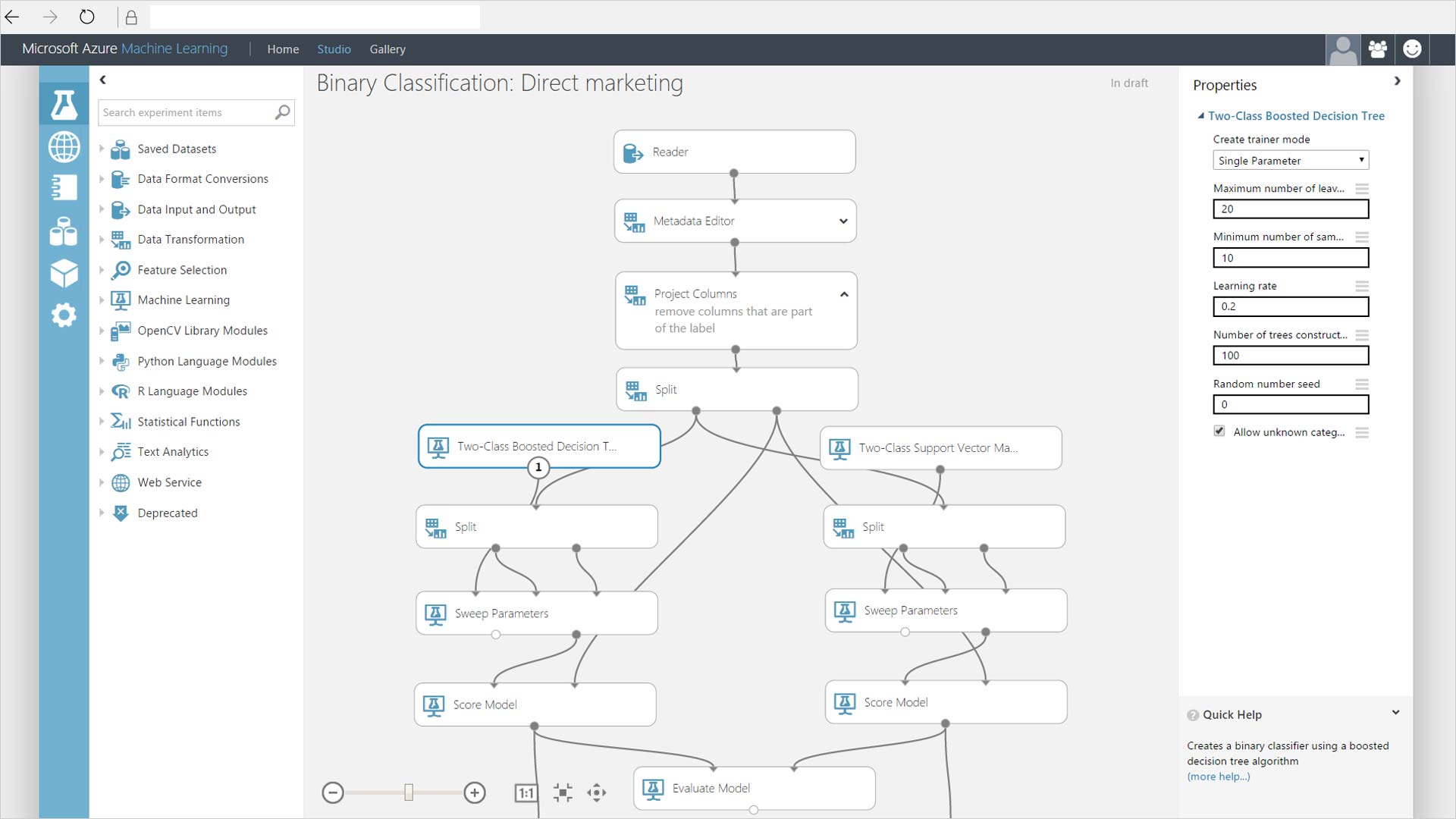
Azure machine learning provides an extensive platform to construct and deploy experiments. It is suitable for both Python and R developers. Moreover, it contains a large number of configured modules that actually helps in data preparation and evaluation. Other than model management services (creating containers for models and managing and deploying models) and experimentation services (track of projects, run history tracking etc.) we can use Azure to train and deploy our project using Azure Virtual Machines, Azure IoT Edge, Machine Learning Server, SQL servers and GPUs etc.
For experimentation services we can use any type of IDE (Integrated Development Environment) such as Tensor Flow, VS Code, Git, Docker etc. Microsoft ML Spark is another important feature of Azure. Some of its benefits includes that it runs on any platform and language that is supported by Spark, it provides machine learning algorithms on spark namely deep learning, computer vision and text analytics, it uses SparkML DataFrames as common format and much more. Additionally, it can handle different data types such as text, images etc.
Antecedent to our work in AZURE ML Studio a design of workflow is important to follow. First one is supposed to acquire and rectangularize the data (reading heterogeneous data, sample, flatten and distill the structure), understand and make the data valuable (infer type and entities, clean and transform) and at last prepare for consumption when we aggregate, compare and validate our data.
Some of the classified steps of dealing with data using ML are:
Ingest and Sample: Data can be stored in Azure Blob storage or SQL DB. File types include SQL, JSON and Parquet. In addition to it we can have delimited files with formats such as CSV, TXV and TXT. Sampling strategies include Top N, Random N, Full file and random %.
Prose: It powers Microsoft Excel Flash Fill. It is used in data preparation to derive, combine and split column by example.
Transforms: Column (duplicate, remove, keep), append rows and columns, adjust precision, join and summarize.
Data Understanding: For data understanding we have a lot of metrics to leverage such as mean, variance, data profile, kurtosis, skewness, median, quartiles, NaN values and much more. There are all together twenty-eight metrics available.
Inspectors: This includes box plot, histograms, scatter plot, time-series, map and column statistics.
Custom Scripts and Extensibility: We can add columns, advanced filter, transform data flow, transform partition.
We want experimentation and model training in ML and for that the Azure ML workbench provides some exclusive features. We can use VS and VS Code Tools for AI: access Azure ML functionalities from VS and VS Code, view list of jobs, view job details, preview and download artifacts from experiments. One also has the option to use Command Line Interface through which AZURE ML functionalities could be accessed.
Furthermore, notebook integration is available. It is fully interactive, with complete markdown and code cells as well as their rendered output. It can also be accessed through local web host browser. There is a Run History and metrics feature available on AZURE ML platform as well. AZURE ML tracks history of experiments using run history service. We can use Azure ML logger to track evolution of metrics across the run. View panel can be customized as well.
One can promote and download the artifacts. Promote means to transform an artifact to an asset (accessible in AZURE ML). Promoting is a way to create association between an asset and a version. One can promote a trained model so that it can be referenced in the scoring script. An asset can be downloaded locally to be then used for creating of image used to serve your ‘Dockerized’ web service.
Transparent compute is the last step of experimentation and model training. Experiments are organized in a way that they can be executed on many compute targets. Compute Target is where the target is run such as Remote Docker, Local Docker, HD Insights etc. Run Configuration is configuration on compute target. The last stage of machine learning process is operationalization. It includes model management, deployment targets(docker based deployments), latency and scalability(for smart-routing and auto scaling), and model data collection(detecting data drifts and loop back while retraining).
This was just a brief introduction and much more learning could be done from AZURE portal itself.
My instructor: Delon Yau, Software Engineer, Commercial Software Engineering, Microsoft.

Leave a Comment